 Aureole
Help center›Create
Have a text read aloud
A document in the Library can become an audio file, read by a voice you choose: to listen to it while walking, make it a voice-over or an audiobook. This guide shows how to have it read, choose the voice, set it, and export the reading.
- Open a document, then “Narration”, at the top.
- Choose the voice and the engine, then generate the chapters.
- “Export as M4A to the library” files the reading in “Audio”.
Open narration
In the Library, open a document, then “Narration”, at the top. The document is split into chapters, by its headings; on the right, the voice, the direction and playback:
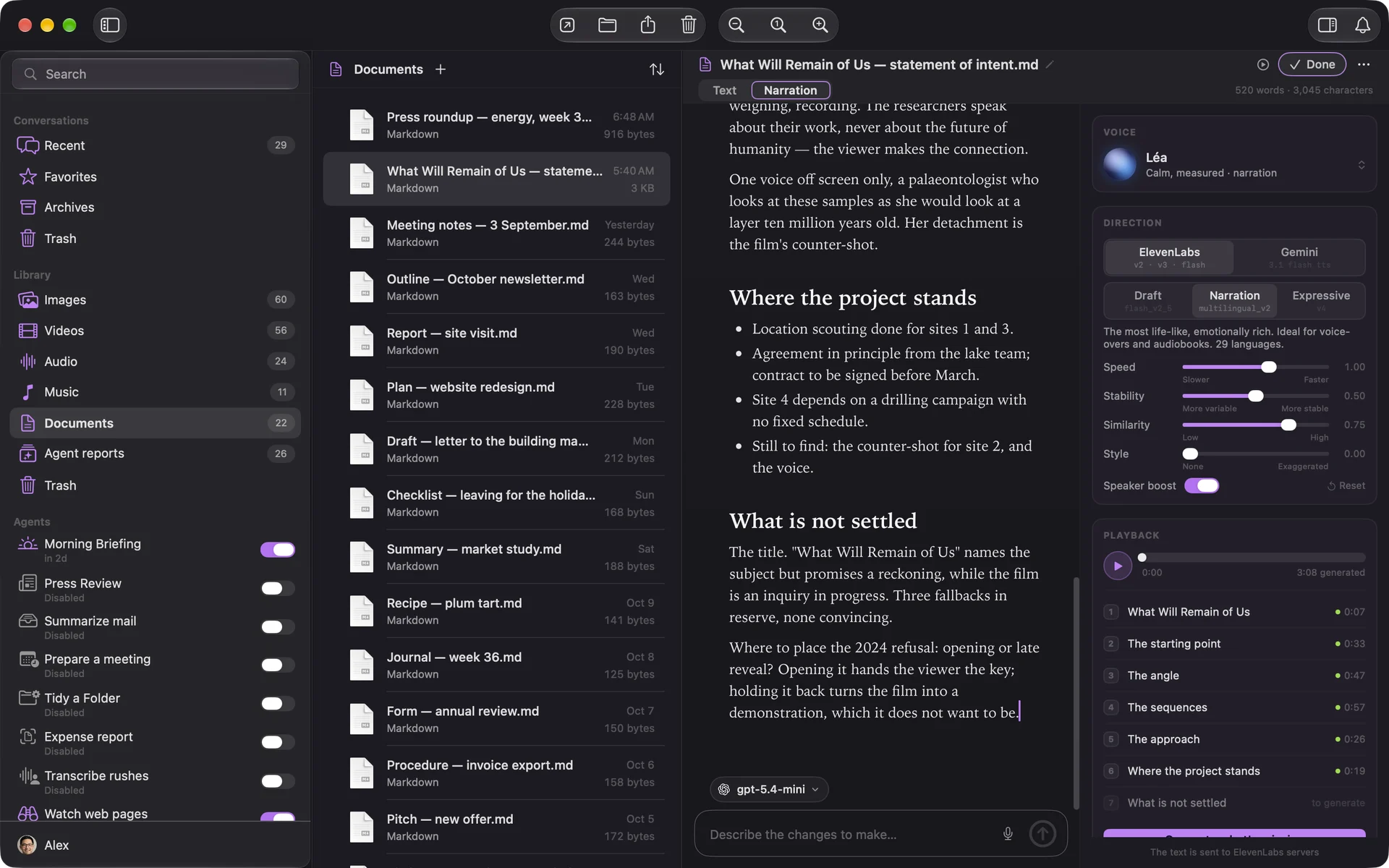
Code blocks and images aren’t read. The document itself is never changed; the narration is kept with it, ready to resume.
The voice and the engine
Two engines read: ElevenLabs, the most natural, and Gemini, with thirty voices. ElevenLabs has three levels: “Draft”, fast and cheaper, for a try; “Narration”, at first; “Expressive”, the liveliest. Sliders set speed, stability and style.
With only an OpenRouter key, ElevenLabs offers its default voices: the voice library, voice design and cloning need an ElevenLabs key.
Choose, design or clone a voice
“Change…”, on the voice card, opens the ElevenLabs voice picker:
- “Library”: the voices shared on ElevenLabs, filtered by language, accent, gender, age;
- “Design”: describe the voice, its timbre, its age, its tone; Aureole offers three previews. Don’t name a real person;
- “Clone”: import or record a few dozen seconds of a clearly audible voice, then certify you have the rights to that voice and the person’s consent. That consent is asked again with every clone;
- “My voices”: the ones you added, designed or cloned.
Generate and export
“Generate what’s missing” reads the chapters that don’t have a voice yet; a chapter whose text or voice changed is flagged, to regenerate. Reading goes on even if you leave the document. With an ElevenLabs key, the text being read lights up during playback.
“Export as M4A to the library” assembles all the chapters into one file, filed in “Audio”, under the document’s name.
What goes out, and what it costs. The text is sent to the voice’s provider, ElevenLabs or Gemini. The cost can be read in My Account, under “Speech”; with ElevenLabs, narration also shows the character quota you have left this month.
If you’re stuck
Monthly quota insufficient
Your ElevenLabs plan doesn’t have enough characters left for what remains to be read: wait for next month, change plans, or switch to Gemini.
I can’t find Design or Clone
They need an ElevenLabs key: through OpenRouter, only the default voices are available.
No voice slot available
Your ElevenLabs plan limits the number of voices: delete one in “My voices”.
The cloned voice needs verification
ElevenLabs sometimes asks you to verify a voice on its site before using it. It already appears in “My voices”.
Something missing from this guide? Tell us.