 Aureole
Help center›Personalize
Manage what Aureole remembers
From one conversation to the next, Aureole keeps what lasts: your job, your preferences, your ongoing projects. Its memories stay on your Mac, and you can see them all. This guide shows how it chooses them, how to correct or erase them, and how to talk without leaving anything.
- All memories are in Settings›Memory: a click unfolds one, the pencil edits it, the trash deletes it.
- Say “remember that…” for it to remember at once; the rest is sorted later.
- A private conversation leaves no memory.
What Aureole remembers
When you tell it “remember that…”, Aureole remembers it at once. For the rest, it notes your exchanges, then, a little later, rereads the conversations and keeps only what will last: not a one-off request, nor the content of an email or a document. This rereading happens with the conversation’s provider: nothing goes elsewhere.
Memories personalize the answers in conversations; the menu’s actions don’t receive them.
See its memories
Settings›Memory sorts them into four types: “About you”, “Guidance”, “Project” and “References”:
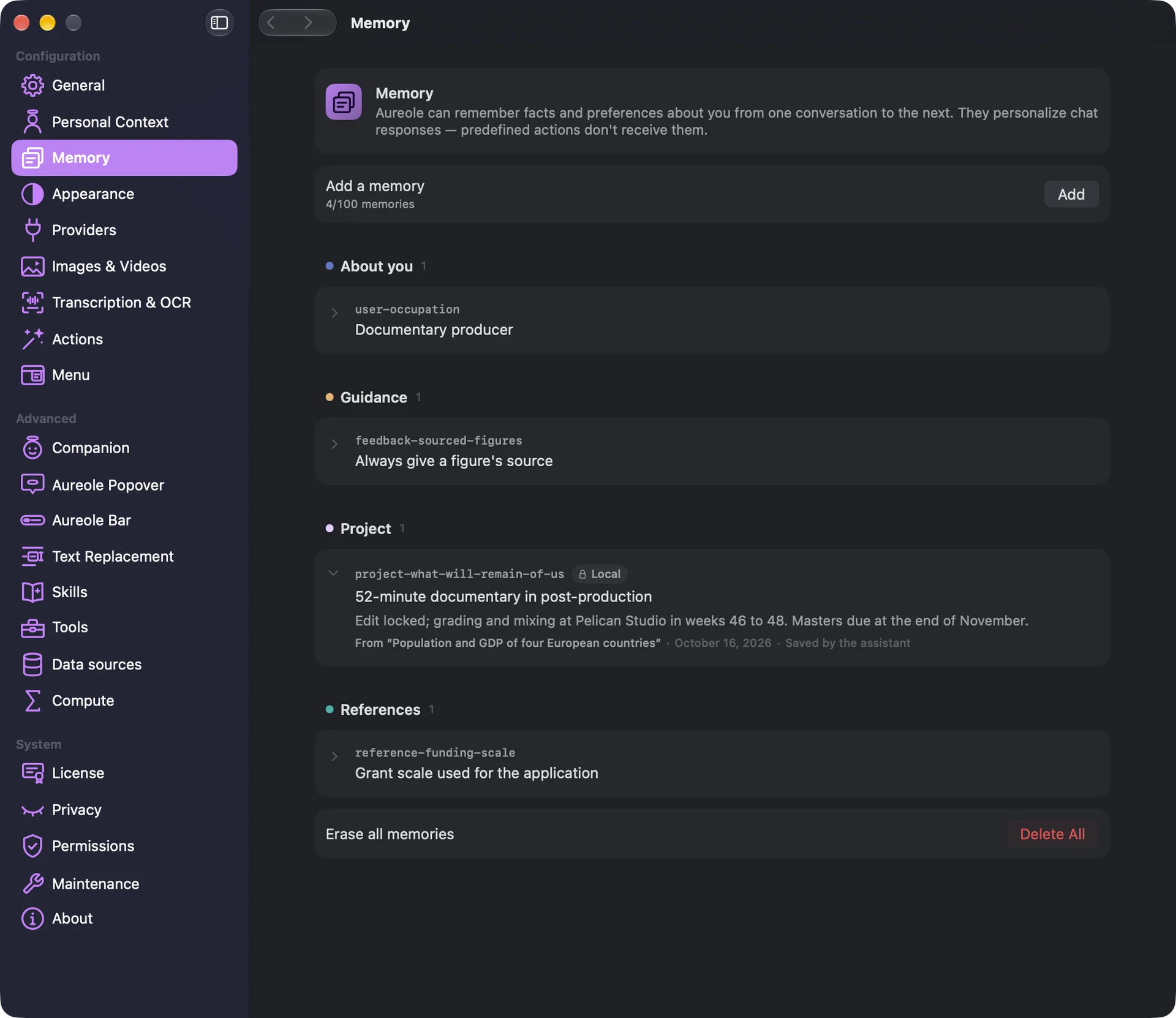
A click on a memory unfolds it: its full content, and where it comes from, the conversation it was drawn from, at your request or kept later. A hundred memories at most.
Correct, add, delete
Hovering over a memory, the pencil edits it, and the trash deletes it, at once. A memory you edited is no longer touched by Aureole. “Add”, at the top, creates one yourself: a short summary, always sent, and a full content, read when needed. Write it in the app’s language: that’s the language Aureole searches its memories in.
“Delete All”, at the bottom, erases all the listed memories, with no way back.
Keep a memory for local models
A right-click on a memory offers “Reserve for local models”: marked “Local”, it’s never shown to online models again, nor to a local server installed on another machine; only a model running on this Mac sees it. What you tell a local model is reserved this way by default.
Talk without leaving anything
A “New Private Conversation”, in the menu of the new-conversation button , or ⇧⌘N, adds nothing to memory; it only reads existing memories. Messages still go to the model’s provider.
When you delete a conversation, a checkbox also offers to forget the memories that only come from it.
Other memories
A working folder has its own memory, stored in the folder, and not versioned at first; “Version the working folder memory”, in its menu, includes it in your version control. An agent has its own too, in its menu , “Memory…”: a note can be pinned to your memory there, or deleted.
If you’re stuck
I can no longer add a memory
Memory is full, at a hundred memories: delete one.
Aureole remembered something wrong
Correct it with the pencil , or delete it. You can also tell it: “forget that…”.
A memory seems ignored
It may be written in another language than the app’s: rewrite it in the app’s language.
Something missing from this guide? Tell us.